Screening alarm
The screening alarm can be used to detect temperature anomalies in a series of inspected objects in a similar/fixed setup.
General
The basics of the screening alarm is to first build up a base of reference temperature samples. When an object is screened, the camera compares the measured temperature with the average of the reference samples. If the camera detects a temperature that is above a specified threshold, an alarm will trigger.
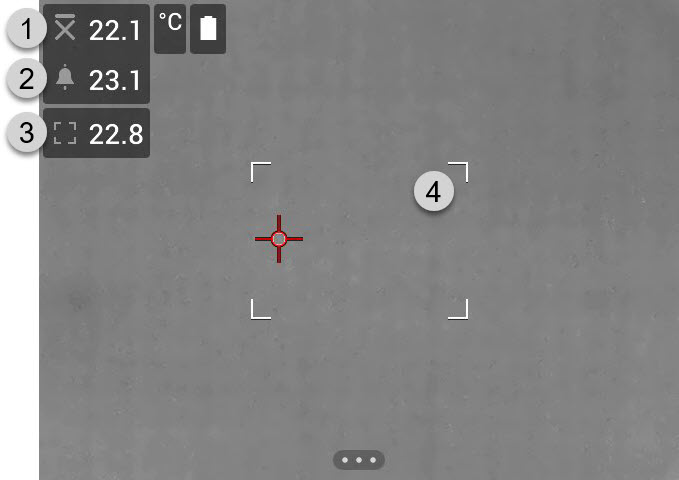
Sampled average temperature.
Alarm limit.
Measured temperature.
Measurement box.
The camera detects and measures the temperature of the hottest spot within the measurement box.
An alarm will trigger when the measured temperature is higher than the alarm limit. The camera will also apply a red color to all parts of the image with a temperature above the alarm limit.
The alarm limit is the sum of a sampled average temperature and a specified allowed deviation.
Work flow
The screening work flow involves the following steps:
Activate and configure the screening alarm.
Record reference samples.
Perform the screening.
Record new samples to keep the sampled average up to date.
Activate and configure the screening alarm
-
Enable the screening mode by selecting
 (Settings) > Device settings > User interface options > Screening mode = On.
 -
Activate the screening alarm by selecting
 (Recording
mode) >
(Recording
mode) >  (Screening).
 In the Screening dialog box, you can define the settings for the alarm:
Allowed deviation: The allowed deviation from the sampled average.
Alarm sound: Beep or no sound when the alarm triggers.
Record reference samples
Before the screening can start, you must record reference samples. These are used to calculate the reference temperature average.
You record the reference samples by screening 10 inspection objects. Make sure these objects have a normal temperature.
Aim the camera toward an inspection object with a normal temperature. The object should be within the frame of the measurement box.
Adjust the camera focus.
NoteIt is important to adjust the focus correctly. Incorrect focus adjustment affects the temperature measurement.
-
To record a sample, push one of the programmable buttons.
NotePush the programmable button shortly. If you push and hold the button, the sampled average will be reset.
Repeat the steps above until 10 samples have been recorded.
Perform the screening
Aim the camera toward an inspection object. The object should be within the frame of the measurement box.
Adjust the camera focus.
NoteIt is important to adjust the focus correctly. Incorrect focus adjustment affects the temperature measurement.
The camera measures and evaluates the temperature. If the temperature is higher than the alarm limit, an alarm will trigger. The camera will apply a red color to all parts of the image with a temperature above the alarm limit.
-
Optionally: Record a new sample.
Push one of the programmable P buttons.
NotePush the programmable button shortly. If you push and hold the button, the sampled average will be reset.
Every time you push the programmable button, a sample is recorded. If you happen to record a sample when the camera is not aiming at an inspection object, you must reset the sampled average and record 10 new samples. To reset the sampled average, push and hold the programmable button.