Editing images
FLIR Ignite allows you and your collaborators to edit your thermal images online in your browser. Image editing works on both desktop and mobile devices.
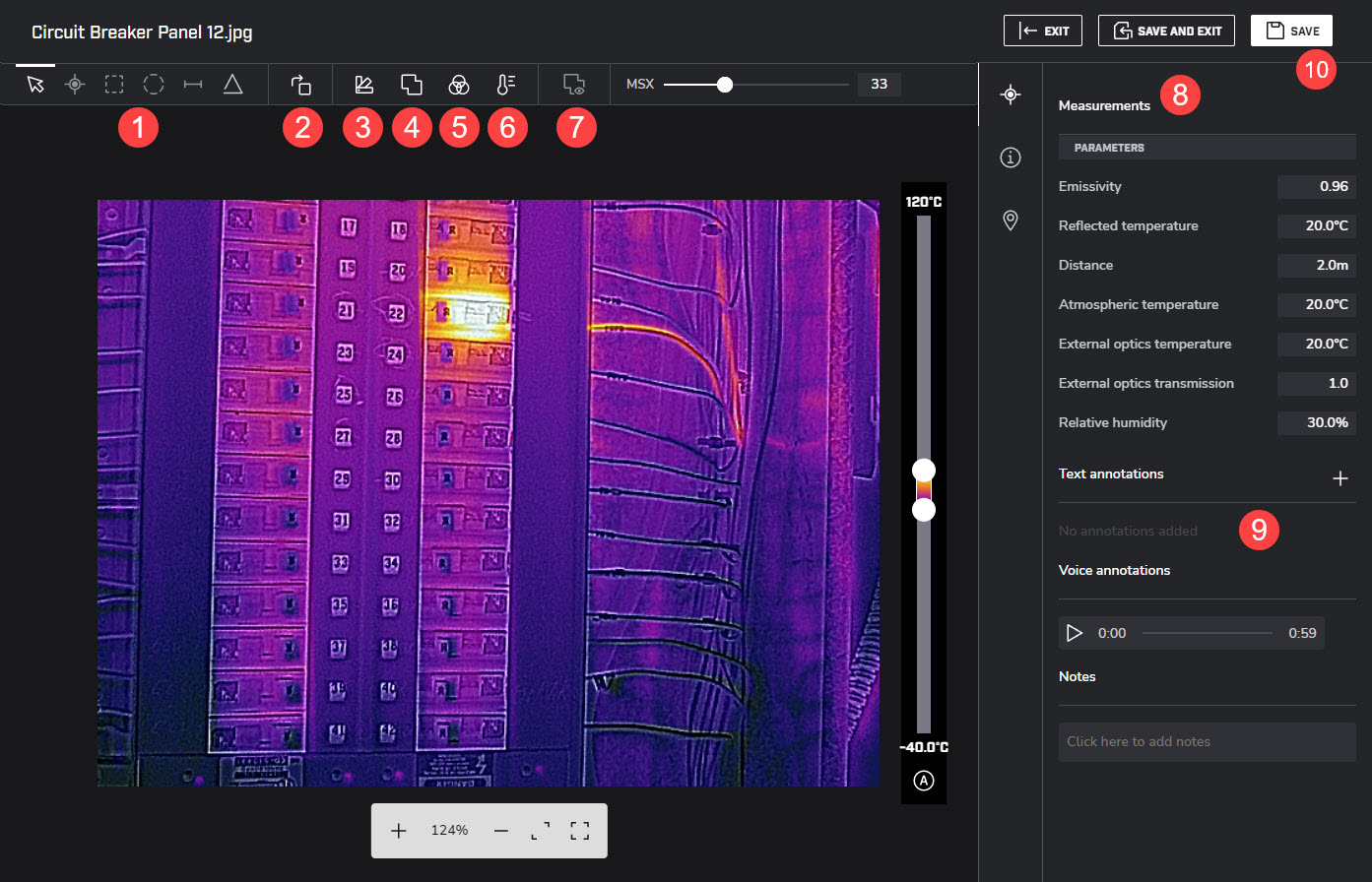
Measurements
Add, remove, or modify measurements like spots, boxes, lines, or ellipses.
Rotate image
Palettes
Select from a set of standard palettes.
Fusion modes
Select your preferred fusion mode to mix a visual image with its corresponding thermal image.
Color distribution
A different color distribution can make it easier to analyze the image more thoroughly.
Isotherms
Use isotherms to apply a contrasting color to all pixels with a temperature Above or Below a certain temperature, or within a certain temperature Interval. Using isotherms is a good method to easily discover anomalies in a thermal image.
Fusion alignment
Move, rotate, and resize the visual image in order to align it with the thermal image.
Image parameters
Edit the parameters of the image.
Annotations and Notes
Add, edit, and remove text annotations and notes. Listen to voice annotations.
Save the image.