Using the high-speed interface (HSI)
General
The high-speed interface (HSI) is included in the FLIR T10xx SC kit. The high-speed interface enables streaming of live video from the FLIR T10xx camera to a PC running the FLIR ResearchIR Max software. The high-speed interface is primarily intended for R&D usage and development purposes. As an example, the camera can capture and stream very rapid processes, which cannot be perceived by the human eye, for later processing and analysis in the PC software. The streamed video is fully radiometric and uncompressed.
System overview
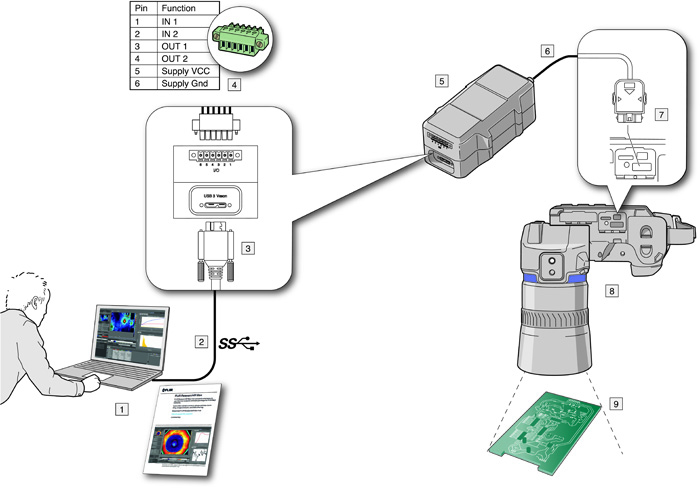
PC running FLIR ResearchIR Max (a download card with a printed license key is included with the HSI box).
USB 3 connection.
USB 3 cable connector.
Optional digital I/O connector.
HSI box
High-speed LVDS connection.
High-speed interface cable connector.
FLIR T10xx camera, optionally with a close-up lens.
Object of study.
Quick start guide
Follow this procedure:
Go to http://support.flir.com/rir4 and download FLIR ResearchIR Max.
Install FLIR ResearchIR Max.
Start FLIR ResearchIR Max.
When asked for the license key, enter the license key that is printed on the FLIR ResearchIR Max download card. The card is included with the HSI box.
Connect the HSI box to the computer using the provided USB 3 cable.
Connect the camera to the HSI box using the integrated high-speed interface cable.
Start the camera. This displays a start-up dialog box in FLIR ResearchIR Max. If the start-up dialog box is not displayed, go to View > Startup Dialog.
In the start-up dialog box, click the camera you want to connect to.
For more information about the installation and connection processes, see the FLIR ResearchIR Max manual.
HSI box indicator LED
|
Indicator LED status |
Explanation |
|---|---|
|
The indicator LED displays a continuous blue light. |
The HSI box is operational, and video data is now continuously streamed to the computer. |
|
The indicator LED displays a flashing blue light, with a period time of about 1 second. |
The HSI box is connected to the computer, but the link between the camera and the box is not up. Either the cable to the camera is not correctly connected or there is another error on the link. |
|
The indicator LED displays a continuous blue light with short interrupts. |
Each interrupt in the continuos light indicates a bit error in the video data stream. |
Digital I/O
For information about the optional Digital I/O connection, see sections Digital I/O pin configuration and Digital I/O connection diagram.