Screen elements
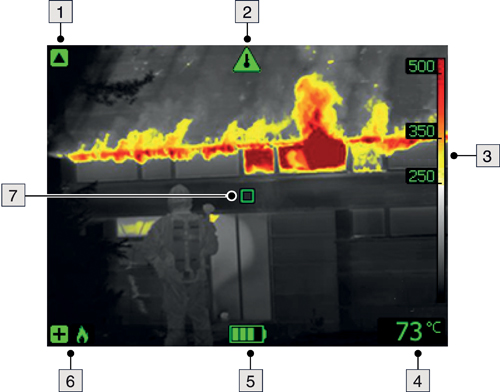
Low-sensitivity range indicator.
Overheating indicator. The indicator provides a visual warning to the user that the thermal imager is about to shut down due to internal overheating.
Temperature scale.
Digital readout of the temperature at the position of the spotmeter.
Battery status indicator.
Camera mode indicator (e.g. fire mode).
Spotmeter.
The icons are displayed in green or blue, depending on the selected camera mode.
The green icon color indicates that the camera is in a mode where it automatically switches between the high-sensitivity range and the low-sensitivity range, depending on the temperature of objects in the field of view.
The blue icon color indicates that the camera is in a mode where the temperature range is locked to the high-sensitivity range.