Partial discharge detection
The availability of the partial discharge detection feature depends on the camera model.
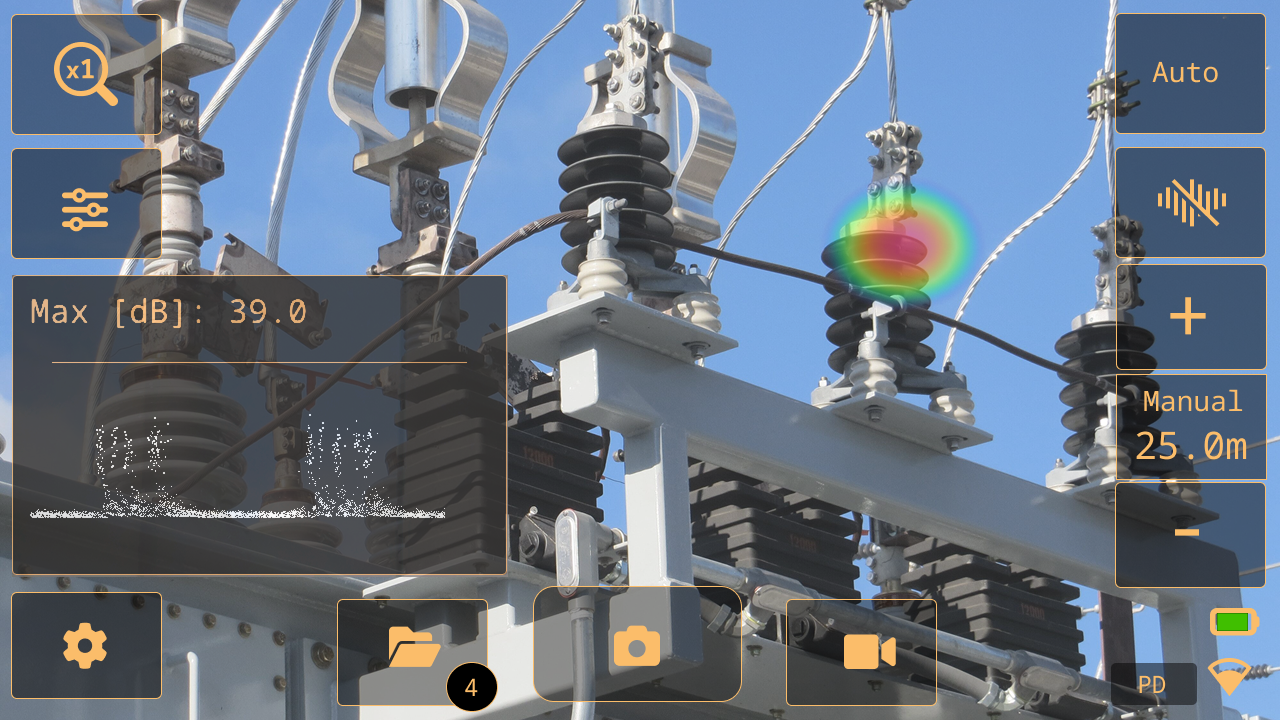
When an electric component begins to fail, one of the first indicators is sound. This sound is caused by partial discharges, that signal the harmful flow of electricity and deteriorate components over time.
The camera detects partial discharges based on the sound they emit.
By filtering out the background noise and focusing on the high and ultrasonic frequencies, where the sound of partial discharges typically is much stronger, the camera can determine if the sound source is likely to be a partial discharge.
When a potential partial discharge is detected, the camera will display a Phase-Resolved Partial Discharge pattern - or PRPD - in the analysis results on the screen.
When you take a snapshot of a potential partial discharge, the camera will perform detailed analysis and provide information regarding the probable type of partial discharge, the severity of the fault, and recommended actions.
The accuracy of the camera’s severity assessment relies on the Distance, Voltage, and Component parameters entered by the operator.
For more accurate results, it is also recommended to specify the environmental temperature and relative humidity in the camera settings.
Work flow
Make sure the Partial discharge mode is selected.
Start with the Auto filter. Later, you can try if other filter settings are better for the current situation.
Use the Multi-source mode first, which enables you to scan larger areas and find several sound sources at the same time.
To inspect interesting sound sources more closely, switch to Single-source mode.
When a potential partial discharge is detected, the camera displays a PRPD pattern in the analysis results on the screen.
To analyze the potential partial discharge, do the following:
Tap the Snapshot button.
Enter the Distance, Voltage, and Component parameters.
Tap the PD analysis button.
The camera displays the analysis results, see section Partial discharge analysis results.
For more accurate results, enter the environmental temperature and relative humidity. On the Settings menu, tap Power mode settings.
You can take snapshots and videos of the detected partial discharge for further inspection and reporting in the FLIR Acoustic Camera Viewer or FLIR Thermal Studio.
To retrieve a PD analysis from your snapshot, tap the Archive button, select the desired PD snapshot, and then tap the PD Analysis button.
Partial discharge parameters
When analyzing partial discharges, the camera uses information about the distance, voltage, and type of component. The more exact you specify these parameters, the more precise the severity assessment will be.
When you take a snapshot of a detected partial discharge, the camera saves also the current partial discharge parameters settings. This means you can edit the parameters later using the FLIR Acoustic Camera Viewer or FLIR Thermal Studio.
Distance
Information about the distance, from the camera to the sound source, is used by the camera to adjust for the natural decrease in sound intensity as distance increases.
To set the distance, do the following:
In live view, use the Distance buttons (+ and -).
In the snapshot preview, change the Distance setting.
Results overview
In Partial discharge mode, the camera displays the following at the top of the screen:
SPL: Sound Pressure Level is a measure of the strength of a sound.
PRPD pattern of a detected partial discharge.
The absolute SPL reading depends on the selected filter. To ensure that the results are comparable across different filters, the camera displays a normalized SPL value, that matches what the result would be with a measurement bandwidth of 20 kHz.
Partial discharge analysis results
This image shows the results displayed by the camera after the analysis of a snapshot.
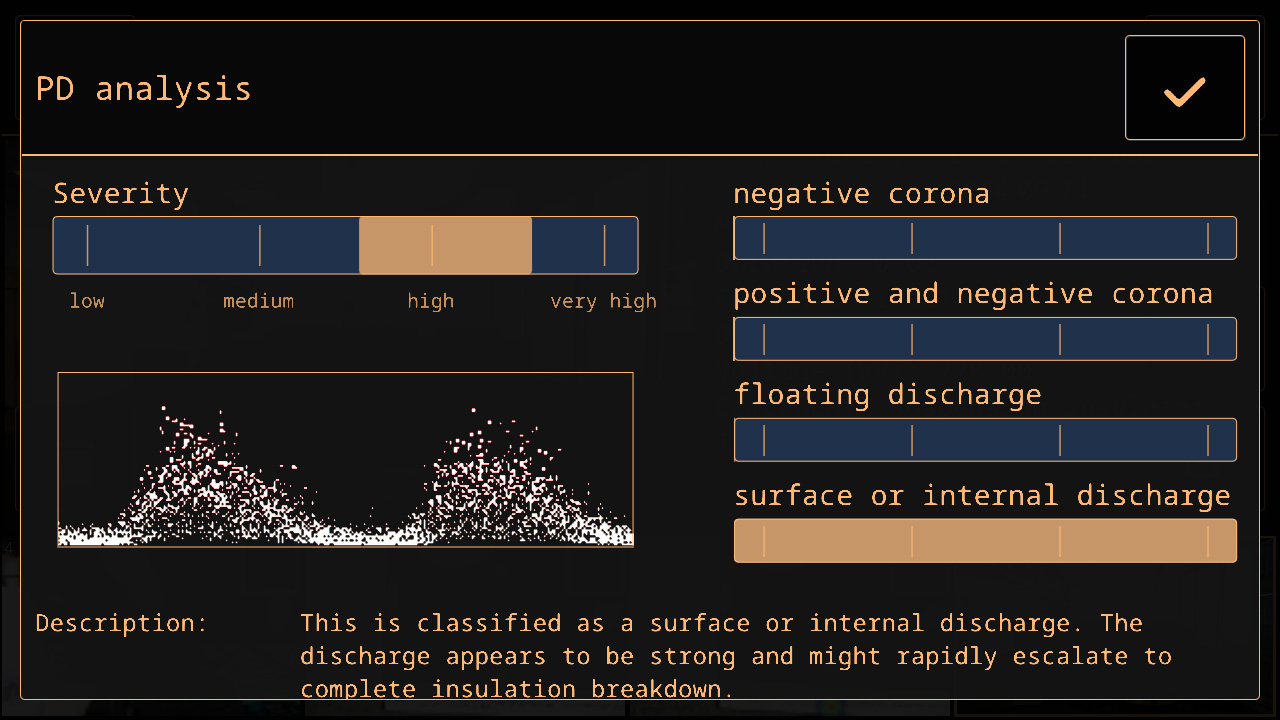
PRPD pattern
The Phase-Resolved Partial Discharge pattern – or PRPD – is a widely used tool for analysis and diagnosis of partial discharge activity.
Partial discharge activity occurs due to defects in electrical components. Each “dot” in the PRPD pattern corresponds to an event caused by a discharging defect.
There are several different types of partial discharges. Each type typically has a distinct PRPD pattern.
Partial discharge types:
Negative corona
Positive and negative corona
Floating discharge
Surface or internal discharge
The length of the color bar reflects the system’s confidence in identifying a specific type of detected partial discharge. If multiple color bars have nearly identical lengths, it indicates uncertainty about the exact type.
Severity assessment
The severity bar indicates the estimated severity of the detected partial discharge.
The assessed severity is also shown as text. The Description describes the type of partial discharge, while the Recommendation provides suggestions for the actions to be taken.
The severity assessment only provides general guidelines based on the likely type of partial discharge and the data available. Always consult an expert to decide on the actions that need to, or need not to, be taken when a partial discharge has been detected.
The more exact the distance, voltage, and type of component parameters are specified, the more precise the severity assessment will typically be.